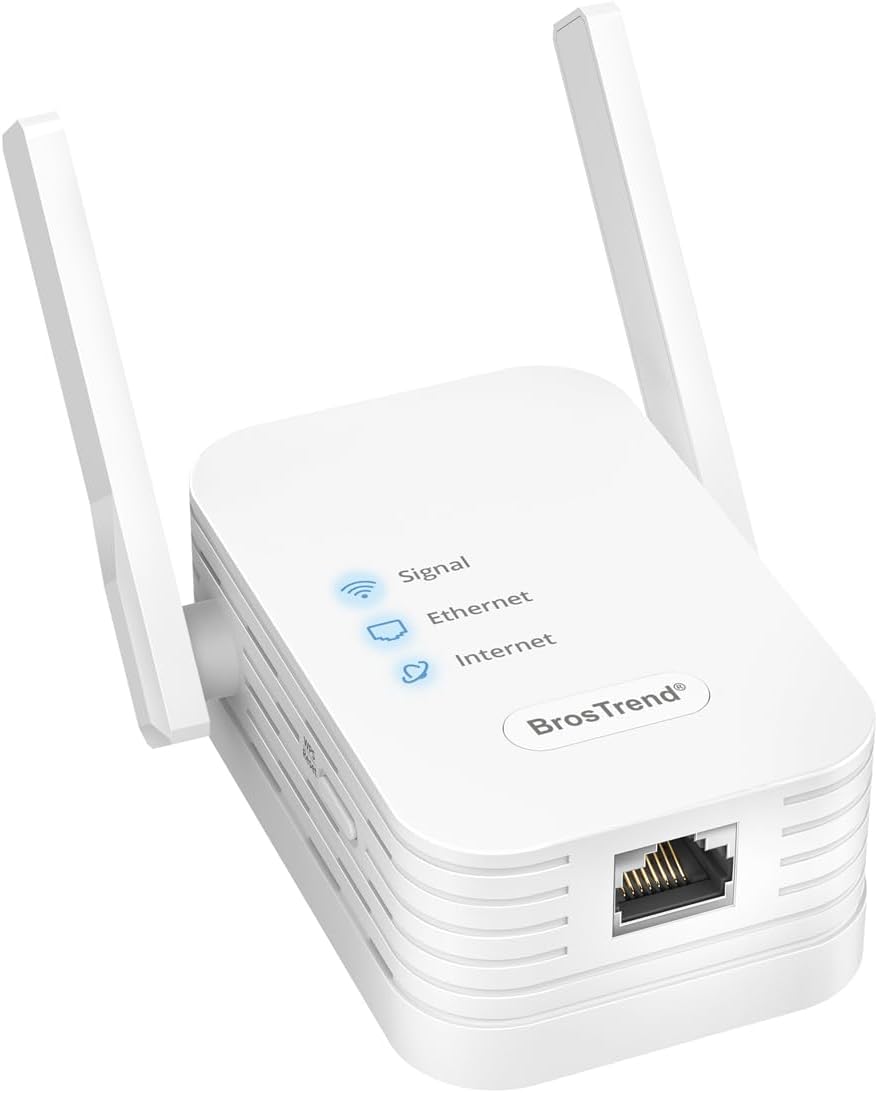


Fiche Technique BrosTrend N300 WiFi Ethernet Adapter, 2.4GHz Bridge WiFi Ethernet, WiFi Antenna RJ45 for Printer, IP Camera, TV, Game Console, Xbox, RJ45 WiFi Adapter Supports Disable Network Extend au Maroc
The video showcases the product in use.The video guides you through product setup.The video compares multiple products.The video shows the product being unpacked. hero-video Merchant video
 Connectez Votre Appareil Filaireau WiFi
Bénéficiez d’une connexion fiable sur votre appareil filaire grâce à cet pont WiFi Ethernet économique. Il se connecte à votre routeur sans fil à 300Mbps sur la bande 2.4GHz et établit une connexion fiable sur votre appareil grâce à son port Ethernet rapide.
 S’ajustent pour un Meilleur Signal
Reçoit un signal plus fort que les autres adaptateurs dotés uniquement d’antennes internes.
 Trouver l’Emplacement Optimal
Repérez facilement l’emplacement idéal, pour garantir une connexion fiable sur votre appareil.
 Désactiver le WiFi étendu
Gérez les SSID inutiles via l’interface Web, en personnalisant la config suivant vos besoins.
1 Antennes Rotatives
2 Voyant LED de Signal
3 Customisez Votre Config

 Sécurise Vos Données
Protège chaque connexion en prenant en charge les protocoles WPA2-PSK, WPA-PSK et WPA2-PSK/WPA-PSK.
 S’intègre à Votre Environnement Domestique
Le facteur de forme peu encombrant assure à la fois la praticité et le charme esthétique.
 Se Connecte en Fluidité à Votre Réseau WiFi
Compatible avec tous les routeur WiFi, qu’ils soient livrés par un FAI ou achetés par un particulier
1 Chiffrement Avancé
2 Design Compact
3 Compatibilité Universelle
Configuration WPS Facile Étape 1
Appuyez sur le bouton WPS de votre routeur WiFi existant.
 Étape 2
Appuyez sur le bouton WPS de cet adaptateur pendant 1 seconde. Une fois que le réseau étendu apparaît, attendez environ 2 minutes pour que l’adaptateur se connecte complètement à votre routeur WiFi.
 Étape 3
Placez l’adaptateur à mi-chemin entre votre routeur et votre appareil. Connectez votre appareil filaire à l’adaptateur à l’aide d’un câble Ethernet. L’installation est terminée !

Choisissez votre Bon Adaptateur
Add To Basket
Add To Basket
Add To Basket
Add To Basket
Customer Reviews
3.7 out of 5 stars 250
4.2 out of 5 stars 5,565
4.2 out of 5 stars 521
4.1 out of 5 stars 314
Price
€34.99€34.99
€39.99€39.99
€59.97€59.97
€79.99€79.99
Vitesse du Ethernet
100Mbps
100Mbps
1Gbps (1000Mbps)
1Gbps (1000Mbps)
Norme WiFi
WiFi 4
WiFi 5
WiFi 6
WiFi 6
Vitesse 5GHz
–
5GHz 867Mbps
5GHz 1201Mbps
5GHz 2402Mbps
Vitesse 2.4GHz
2.4GHz 300Mbps
2.4GHz 300Mbps
2.4GHz 300Mbps
2.4GHz 574Mbps
Type d’Antenne
2dBi
3.5dBi
Gain élevé 5dBi
Gain élevé 5dBi
Méthode installation
WPS, WEB UI
WPS, WEB UI
WPS, WEB UI
WPS, WEB UI
Setup sans pilote
✔
✔
✔
✔
Connect a Wired Device to Wi-Fi: Enable WiFi connectivity for your wired device with this WiFi Ethernet adapter. It connects wirelessly to your router or gateway and provides a stable connection to your local network connected device.
Fast Ethernet Port: This WiFi Ethernet Bridge has a standard RJ45 Ethernet port, allowing your device to access the internet at a wired speed of up to 100Mbps. Enjoy a fast connection for browsing, streaming, and printing.
UNIVERSAL COMPATIBILITY: This WiFi to Ethernet adapter seamlessly supports a wide range of wired devices, including TVs, printers, computers, VoIP phones, cameras and more.
Keep Your Space Clean: No additional charger is needed thanks to this WiFi to Ethernet’s built-in power supply, which contributes to a clutter-free environment. Compatible with a wide range of supply voltage from 100V-240V
Stronger Signal Reception: Equipped with 2X external antennas, this RJ45 WiFi antenna establishes a robust connection with your WiFi router, ensuring better signal even through walls and floors.
Installation Notice: After the appearance of the wide area network, please wait about 2 minutes for the adapter to fully connect to your WiFi router. Once connected, you can move it again and use it with your wired device.
Avis sur BrosTrend N300 WiFi Ethernet Adapter, 2.4GHz Bridge WiFi Ethernet, WiFi Antenna RJ45 for Printer, IP Camera, TV, Game Console, Xbox, RJ45 WiFi Adapter Supports Disable Network Extend
Les acheteurs qui ont testé BrosTrend N300 WiFi Ethernet Adapter, 2.4GHz Bridge WiFi Ethernet, WiFi Antenna RJ45 for Printer, IP Camera, TV, Game Console, Xbox, RJ45 WiFi Adapter Supports Disable Network Extend ont donné la note 4/5
vous pouvez lire tous les avis via ce lien

Le Prix BrosTrend N300 WiFi Ethernet Adapter, 2.4GHz Bridge WiFi Ethernet, WiFi Antenna RJ45 for Printer, IP Camera, TV, Game Console, Xbox, RJ45 WiFi Adapter Supports Disable Network Extend au Maroc
Voici le prix pour acheter BrosTrend N300 WiFi Ethernet Adapter, 2.4GHz Bridge WiFi Ethernet, WiFi Antenna RJ45 for Printer, IP Camera, TV, Game Console, Xbox, RJ45 WiFi Adapter Supports Disable Network Extend au Maroc
Dhs