


Fiche Technique NEXAS NexLink Bluetooth 5.0 OBD2 Scanner,Wireless Compatible with Third-Party Apps,Car & Motorcycle Universal Code Reader Check Engine Fault OBDII Adapter Scan Tool for iPhone, Android & Windows au Maroc

What Is NEXAS NexLink Bluetooth Code Reader?
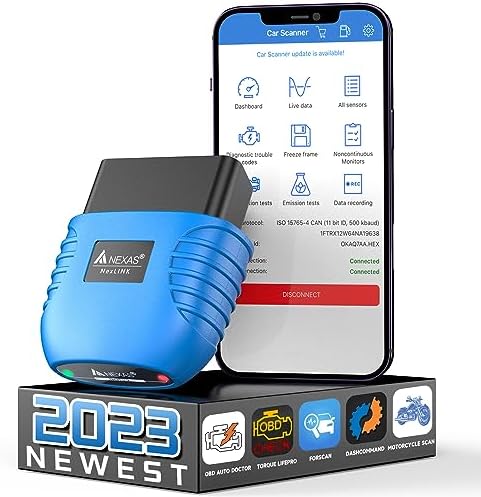
Nexas NexLink is a user-friendly and small OBD2/EOBD Bluetooth interface that turns your smartphone, pad or laptop into a sophisticated diagnostic tool and real-time performance monitor. Download the required OBD2 app, connect the device, and you can read and clear vehicle fault codes, read live sensor readings, read various live data, etc. Moreover, there is no Bluetooth diagnostic device that can diagnose both cars and motorcycles, but Nexas NexLink can!The device works for vehicles (which must be OBD2 compatible) all over the world, such as cars and light trucks (minivans, SUVs, pickups, etc.). Generally, these are vehicles sold in the U.S. that were manufactured after 1996, European vehicles manufactured after 2002, and Asian vehicles manufactured after 2008. Some gasoline vehicles manufactured in 1994 and 1995 are also OBD2 compatible (check the exhaust sticker under the hood to determine if it is OBD2/EOBD compatible). Vehicles in other regions that are OBD2/EOBD/JOBD compatible: Argentina-2008(domestic), 2009(import), Australia-2006(gasoline), 2007(diesel), Brazil-2007(gasoline), Canada-1998, China-2008(gasoline), 2011(diesel), European Union-2002 (gasoline), 2004(diesel), India-2010, Israel-2003, Japan-2008, Mexico-2006, Russia-2010, South Korea-2007, New Zealand-2006(gasoline), 2007(diesel).

Why Choose NEXAS NexLink Bluetooth Code Reader OBDII Scanner?
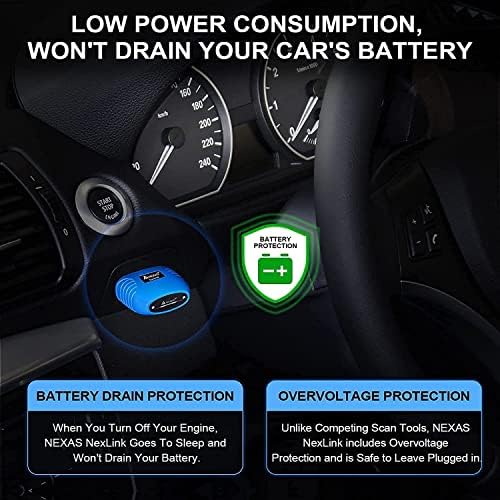
Bluetooth 5.0: Stable connection and fast data transmission. Low power consumption, will not drain your car battery.Enhanced diagnostics: Read (and clear) manufacturer-specific codes and access live parameters on a wide range of Ford, GM, Mazda, Nissan, Toyota, VW/AUDI/SKODA/SEAT, BMW/MINI and more vehicles.Unique Motorcycle Diagnostic: This scan tool can be used not only for cars, but also for motorcycles. Take it with your motorcycle so you can ride safely.Dozens of compatible Apps: More are constantly being added, some may require a separate purchase, this depends on the APP developer.Unmatched Performance: View multiple live parameters and enjoy smooth displays and graphics.Hacker-proof: Unique security mechanisms eliminate the risk of unauthorized access.
IMPORTANT NOTES:
A third-party app/software is required to use all the features. (Check the recommendations in the description below, some may require separate purchases).It does not use WiFi for connectivity. When using it with iOS devices, pair NOT with “NEXAS***” from the iOS Bluetooth device list. Launch the app, connect and connect through the app. If you tried to pair the device (and received the error message ” Not supported”), please restart your iOS device.Please make sure the location feature of your phone is turned on when performing bluetooth pairing.If a different fault code is read, it is normal; the fault code under the OBD2 protocol is different from the protocol of the professional equipment used by the workshop, but the engine fault point is the same.If you are not sure whether NEXAS Bluetooth OBDII supports your car, transmit car model and year to U.S, we will provide you with a suitable APP and tell you how to install and use this device.Please make sure the App you need is compatible with your phone system, or this scanner cannot connect with your phone.

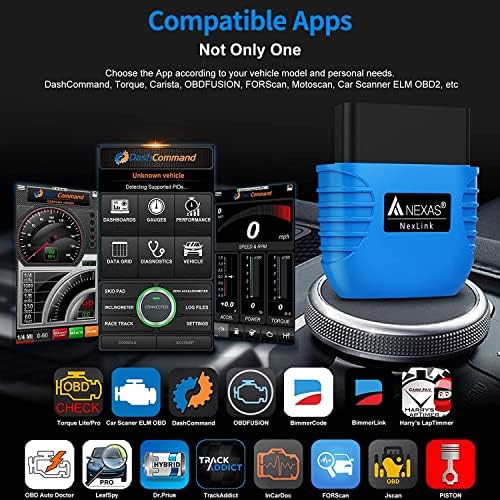
Compatible with Various Apps(Please note that the Fee listed is only for reference):
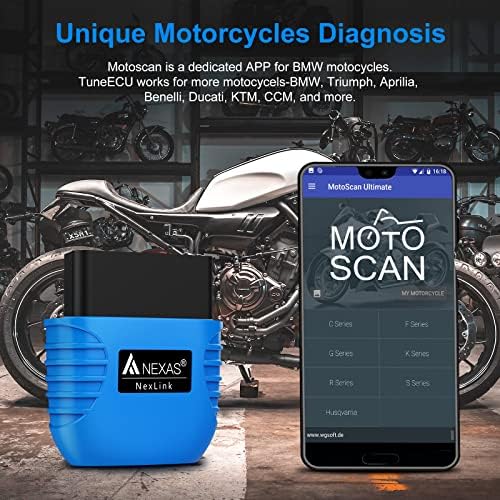
Motoscan (Android ONLY): for BMW motorcycles (motorcycles before 2017 need to buy a 10PIN adapter cable separately). With the Nexlink adapter, most BMW motorcycles (C, F, G, K, R, S and Husqvarna series) can be fully diagnosed (app must be version 1.66 or higher). An inexpensive solution for all hobbyists and professionals, which we have developed due to many requests from BMW bikers. Read ID, read and clear fault codes, read live data and perform a simple service reset, such as a removal reset, etc.TuneECU (Android ONLY): This APP supports diagnosis of more motorcycle models for Triumph, Aprilia, Benelli, Ducati & Moto Guzzi, Morini, Gilera, Husqvarna, KTM, BMW & CCM., etc.Torque Lite/Pro (Android ONLY): Most popular OBD2 performance and diagnostic tool for Android, supports PID import (retrieve fault codes, sensor data and more).Autoscanner ELM OBD2 (Android, iOS, Windows): See what your car is doing in real time, get OBD trouble codes, vehicle performance, sensor data, etc.DashCommand (Android, iOS): Value 9.99. Turn your phone/pad into an advanced display for your engine data and check why the check engine light keeps coming on.Carista OBD2 (Android, iOS): diagnoses, adjusts and services your vehicle, shows you a list of fault codes stored in your vehicle and their meaning. You can also reset the “Check Engine” light. (Dealer level technology for Audi/VW/Toyota/Lexus/BMW, etc.).BimmerCode (Android, iOS): easily code the ECUs in your BMW or Mini F/G series. > > BimmerLink (Android, iOS): read fault codes from all ECUs and display sensor values in real time, check the current status of D- PF in your vehicle or register a new battery after replacement for BMW or Mini.Leafspy (Android, iOS): For Nissan Leaf owners to monitor battery and other vehicle information normally only visible to the dealer.Dr. Prius (Android, iOS): Helps professional Toyota/Lexus hybrid repairers or owners examine the condition of the high-voltage battery.TrackAddict (Android, iOS): OBD2 live monitor, code scan/reset and data logging.Harrys LapTimer (Android, iOS): the advanced tool for car enthusiasts. It records all kinds of sensor data provided by your smartphone (or external sensors), combines them and makes them available for optimizing your ride.InCarDoc (Android, iOS): tool for reading engine codes, diagnostics, monitoring and logbook. Reads real-time and stored diagnostic parameters from ECU OBD2-compatible vehicles.FORScan (Android, iOS): application specifically for computer diagnostics of Ford / Mazda / Lincoln and Mercury vehicles; reading and resetting fault codes (DTC) for all modules; reading sensors and other data (PIDs) from all modules. > > JScan (Android, iOS): a powerful Jeep diagnostic application. > > Piston (Android only): the application is designed with simplicity in mind.OBD Auto Doctor (Android, iOS, Windows, Mac): Read the status of readiness monitors, on-board diagnostic monitors, Diagnostic Trouble Codes (DTCs), Freeze Frame, Clear Codes and MIL; View OBD2 parameters and sensor data in real time to detect anomalies; Monitor OBD2 sensor data in numeric or graphical display; Support multiple electronic control units such as engine, transmission, etc.HybridAssistant (Android ONLY): Make sure Bluetooth is turned on on your phone/pad. Access the Configure application (click on the “Settings” icon at the bottom left). Click on “Settings” > Click on “Connection Mode” > Select “Bluetooth”. Return to the main interface. APP will prompt you to connect the NEXAS device. Enter “1234” in PIN and click “OK”.

Device Setup Instructions:
Step 1: Download APP and install it on your phone/pad.Step 2: Locate the OBD2 diagnostic port and plug the device into the 16-pin Data Link Connector (DLC) on your vehicle. Make sure the connection is good. “RED LED” is always lit to indicate power. “BLUE LED” flashes when the device is connected for paring or communicating with ECU. If there is no communication, “BLUE LED” may be off.Step 3: Turn the ignition key to the “ON” position (or start the vehicle in neutral).Step 4: Activate Bluetooth on your phone/pad. ( On iOS devices: you will see “NEXAS***” in the list of Bluetooth devices, but DO NOT pair it with here. Please go directly to the settings of the app. On Android or Windows devices: pair with “NEXAS***” in the Bluetooth settings of the devices and connect it by entering PIN with 1234 or 0000 )Step 5: Run the App, make the connection settings. (Please refer to the detailed instructions of connection settings via each app).Note: Please turn the ignition OFF and remove this OBD2 device from your vehicle after vehicle diagnosis.
Examples of App Setup:
OBDFusion (Android, iOS): settings > preferences > communication > communication type > Select Bluetooth LE (iOS) / Bluetooth(Android).DashCommand (Android, iOS): preferences > OBD2 adapter > Bluetooth device.Motoscan ( Android):
Make sure your phone/pad’s Bluetooth is turned on.Android Bluetooth connection settings require prior setup, pairing or connection.Go to the Configure application (click the “≡ three line icon” in the upper left corner).Click “Setting” > Select “Connection” > Connection type is set to Bluetooth > Bluetooth device selection Paired device “NEXAS***”.


Dash Board Display
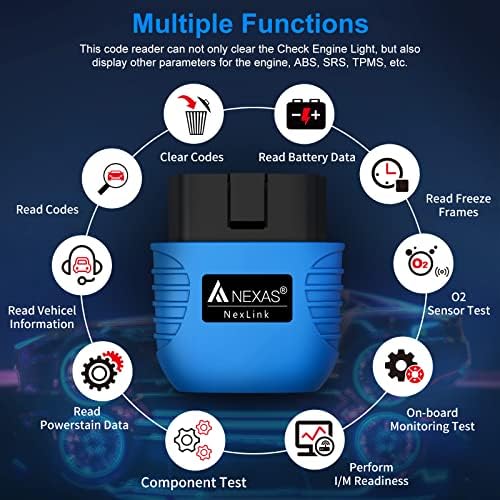
I/M Readiness, Battery test, Freeze frame, O2 sensor and EVAP system test, On-Board Monitoring, Performance Test, etc.
Data Flow Waveform
Read the live data, turn off engine check light in a blink of your eye.
Read and Clear Code
Read and clear fault code with the codes definition.
Diagnose Report Display
Diagnostic reports, Built-in OBD2 Fault code look-up library, no google and no guess.

FAQs:
Q1: Does Nexas Nexlink adapter work with hybrids?
A: Yes, Nexlink has added the HybridAssistant(Android ONLY) app that works for hybrid vehicles. Please note that supported hybrid models include Toyota/Lexus Hybrid, Ford Hybrid, Hyundai Hybrid, and Mitsubishi Hybrid.
Q2: Can I buy this adapter even if I have not used OBD products before?
A: Of course, the Nexas Nexlink adapter is easy to use. Just connect it with Bluetooth and start the engine to begin vehicle diagnostics.
Q3: What if I have tried to connect but the NEXAS adapter does not appear in the Bluetooth list?
A: For iOS users: Restart your iPhone. The NEXAS device name will then be displayed again.
For Android users: try restarting your phone, turn off WiFi and disconnect all other Bluetooth devices from your phone. Or clear the Bluetooth cache/memory: Settings – Apps (View System) – Bluetooth – Memory & Cache, clear it and restart the phone.
Q4: Why could not the app connect to the NEXAS device?
A: First, make sure the app is compatible with your vehicle and phone. Second, make sure the app’s connection settings are correct. Third, remove the app and reinstall it (especially if you have a system software update). Or try another app, for example, Car Scanner ELM OBD2.
Q5: What should I do if no connection can be made to the vehicle/ ECU?
A: First, make sure the vehicle is OBD2 compatible and the device is plugged in well (not too loose). Second, make sure the ignition is on ON (or restart the engine to try). Third, make sure the pins in your vehicle’s OBD connector are not bent or shorted.
🏅[Not only for BimmerCode]Easily pairs with IOS and Android and Windows PCs within these apps. 100% coverage for vehicles, protocols, and advanced features supported by these apps, including DashCommand, ELM OBD, OBDFUSION, BimmerCode, BimmerLink, Harry’s LapTimer, OBD Auto Doctor, LeafSpy, Dr.Prius, TrackAddict, InCarDoc, FORScan, Jscan, Torque Lite/Pro, Car Scanner ELM OBD, LeafSpy, PISTON, ELM OBD, OBD Auto Doctor and more(requires separate downloading or purchase).
🥉[2 IN1 Car & Motorcycle Scan Tool]Nexlink obdii scanner bluetooth allows you to perform engine code, ID, and live data reading, fault code clearing, actuator testing, acceleration testing, engine service intervaling, coding and more on motorcycle. For BMW motorcycles(C, F, G, K, R, S and Husqvarna series) pls chose Motoscan and TuneECU APP, and for Triumph,Aprilia,Benelli,Ducati&MotoGuzzi,Morini,Gilera,Husqvarna、KTM,CCM,pls chose TuneECU only.
🥇[Drive with Confidence] With dashboard function, you can monitor your car’s status in real-time on phone, including coolant temperature, average speed, engine RPM, distance travelled, inst fuel rate, fuel used, turn your phone into a vehicle dashboard with our obd reader. Also you can set up a threshold for coolant temperature,speed etc, there will be color or sound alarm when the threshold is exceeded, to ensure safe driving.
🥈[Live Data Stream Display] Nexlink obd2 scanner diagnostic tool bluetooth display real-time engine parameters in graphics on your phone, such as engine speed, O2 sensor, intake temperature, fuel rail pressure and more. The real-time data feature is very helpful in determining the root cause of the problem since you can see real time data changes at any time. By comparing with freeze frame date, live data will help you to fix the car quickly and efficiently.
🎖️[Suitable for All Devices] Unlike other products that can only connect to android phone, nexlink bluetooth obd2 scan tool works with both Android and iOS system, turn your old phone or Ipad into a mobile dashboard. Nexlink obd-ii reader adopts bluetooth 5.0 connectivity technology for faster and more stable connections, you can move around your vehicle and not loose connection.Please note that location feature of your phone should be turned on when pairing.
Avis sur NEXAS NexLink Bluetooth 5.0 OBD2 Scanner,Wireless Compatible with Third-Party Apps,Car & Motorcycle Universal Code Reader Check Engine Fault OBDII Adapter Scan Tool for iPhone, Android & Windows
Les acheteurs qui ont testé NEXAS NexLink Bluetooth 5.0 OBD2 Scanner,Wireless Compatible with Third-Party Apps,Car & Motorcycle Universal Code Reader Check Engine Fault OBDII Adapter Scan Tool for iPhone, Android & Windows ont donné la note 4.5/5
vous pouvez lire tous les avis via ce lien

Le Prix NEXAS NexLink Bluetooth 5.0 OBD2 Scanner,Wireless Compatible with Third-Party Apps,Car & Motorcycle Universal Code Reader Check Engine Fault OBDII Adapter Scan Tool for iPhone, Android & Windows au Maroc
Voici le prix pour acheter NEXAS NexLink Bluetooth 5.0 OBD2 Scanner,Wireless Compatible with Third-Party Apps,Car & Motorcycle Universal Code Reader Check Engine Fault OBDII Adapter Scan Tool for iPhone, Android & Windows au Maroc
Dhs